
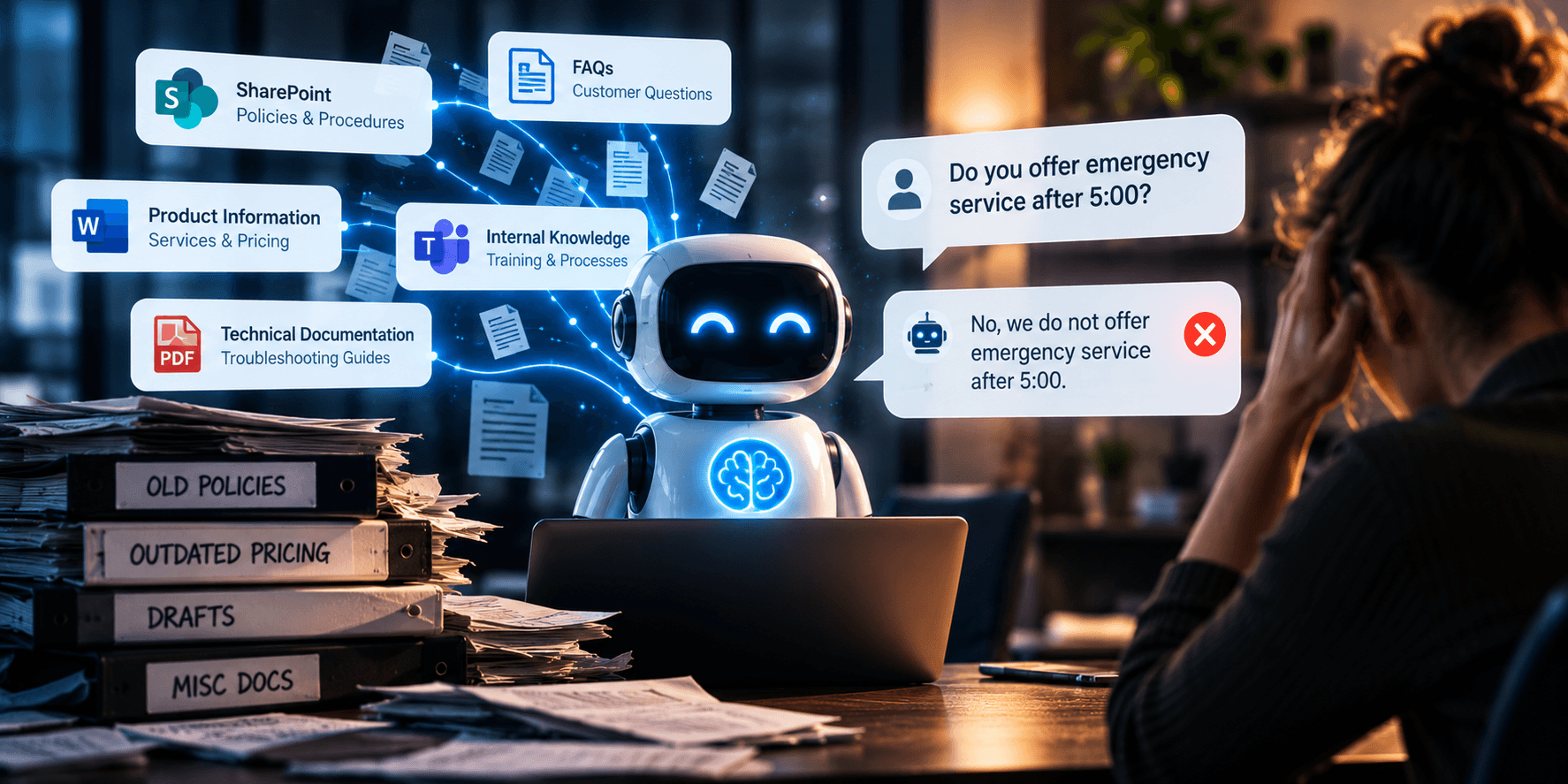
Imagine a customer asking your new AI assistant a simple question:
“Do you offer emergency service after 5:00?”
The AI searches its knowledge and confidently answers, “No.”
There’s just one problem. You started offering after-hours service six months ago, but nobody updated the documentation.
The AI didn’t fail because the technology was broken. It failed because the information it was given was wrong.
That’s one of the most important lessons businesses need to understand as AI moves into customer service, Microsoft 365, and everyday workflows:
Your AI is only as useful as the business knowledge behind it.
AI Needs Something to Learn From
Modern business AI can connect to approved, organization-specific information rather than relying solely on general knowledge.
Those knowledge sources might include:
- Frequently asked questions
- Products and services
- Company policies
- Customer service procedures
- Technical documentation
- Troubleshooting guides
- SharePoint content
- Internal knowledge bases
Microsoft calls these knowledge sources in Microsoft Copilot Studio. They can ground AI responses in information from SharePoint, Data, websites, documents, and other enterprise sources.
3CX takes a similar approach with its AI Customer Service Agent. Businesses can provide knowledge that helps the agent answer customer questions based on company-specific information.
The technology can be impressive. But first, you have to give it something reliable to work with.
Bad Documentation Creates Bad AI
AI can expose a problem businesses have ignored for years: documentation is often a mess. Garbage in, garbage out.
One document says one thing. Another says something different. An employee has a newer version on their desktop. The website hasn’t been updated. Someone changed a process six months ago but never changed the procedure.
Experienced employees learn to work around this. They know which document to ignore and who to ask for the real answer.
AI doesn’t automatically know that.
If outdated, incomplete, or contradictory information is part of your AI’s knowledge, it can affect the answers it provides.
That’s why the first question before deploying customer-facing AI shouldn’t necessarily be:
“Which AI should we buy?”
It might be:
“What information are we going to give it?”
Your FAQs Just Became More Important
Think about the questions your employees answer repeatedly:
- What are your business hours?
- Which areas do you serve?
- What does this service include?
- What’s your cancellation policy?
- How do I get support?
- What happens after I submit a request?
- When should I expect someone to contact me?
Those answers can become part of the knowledge behind an AI customer-service system.
3CX recommends preparing knowledge sources such as FAQs, policies, product information, help articles, and support documentation for its AI agents.
We’ve explored the customer-service side of this in our article, Your Next Customer Service Employee Might Be an AI Agent.
The AI can answer questions and help customers. But first, your business has to know the answers.
AI Makes Institutional Knowledge More Valuable
This connects directly with another business problem we’ve discussed: critical knowledge living inside employees’ heads.
In What Happens When Your Best Employee Leaves and Takes Their Knowledge With Them?, we looked at documentation as a business continuity issue.
AI gives businesses another reason to take that documentation seriously.
If organizational knowledge is current, organized, and accessible, AI can make it much easier for employees and customers to find.
If it isn’t, AI may simply expose the gaps faster. AI doesn’t eliminate the need for knowledge management. It increases its value.
Microsoft 365 Can Become Part of the Knowledge Layer
For businesses already using Microsoft 365, much of the information AI needs may already exist.
The challenge is organizing it.
Microsoft allows SharePoint to serve as a knowledge source for Copilot Studio, allowing agents to use designated SharePoint information when generating responses.
A well-managed SharePoint environment might contain:
- Policies and procedures
- Service documentation
- Training materials
- Product information
- Internal FAQs
- Troubleshooting guides
- Customer service procedures
This is also why Microsoft 365 Solutions should focus on managing, securing, and organizing the platform rather than simply selling licenses.
A pile of documents isn’t automatically a knowledge base.
Permissions Still Matter
There’s another important consideration.
Just because AI can find information doesn’t mean everyone should be able to see it.
SharePoint may contain…
- HR information
- Financial documents
- Contracts
- Customer records
- Management information
- Confidential business procedures
Microsoft’s SharePoint integration with Copilot Studio uses authenticated access so responses can respect the user’s existing SharePoint permissions.
That’s good security, but it also means your permissions need to make sense before you put AI on top of them.
We’ve made the same point in our article, AI Agents Need Their Own Security Strategy: AI access should be deliberate, permissioned, monitored, and governed.
AI doesn’t make access control less important. It makes good access control more important.
Not All Information Works the Same Way
There’s also an important difference between business knowledge and live business data.
- A return policy is knowledge.
- Current inventory is live data.
- A troubleshooting guide is knowledge.
- Today’s appointment availability is live data.
- Your standard service description is knowledge.
- A customer’s current account balance is live data.
3CX makes a similar distinction in its guidance for AI Agent knowledge sources, noting that frequently changing information may need to come from live systems rather than static knowledge.
Good AI implementation means knowing the difference.
Someone Still Has to Own the Information
Here’s the part that’s easy to overlook. Who keeps the AI’s knowledge current?
If your hours change, who updates them? If a product is discontinued, who removes it? If a policy changes, who replaces the old version?
Important knowledge needs:
- An owner: Who is responsible for it?
- A source of truth: Where does the authoritative version live?
- A review cycle: When should it be checked?
- Permissions: Who can see or change it?
- A retirement process: What happens when it’s obsolete?
Otherwise, today’s excellent AI answer can become tomorrow’s confident mistake.
Start with the Questions You Already Answer
You don’t need to document your entire organization before exploring AI.
Start smaller. Ask your sales, customer service, and support teams:
“What questions do you answer over and over again?”
Pick 20.
- Are the answers documented?
- Are they current?
- Does everyone give roughly the same answer?
- Is there an authoritative source?
If not, you’ve identified a practical AI-readiness project.
From there, organize FAQs, policies, service information, and procedures into reliable sources that employees and eventually AI can use.
That’s part of what any good Agentic AI Management Services are designed to address: not simply deploying AI, but preparing the information, permissions, governance, security, and infrastructure behind it.
Your AI Is Going to Represent Your Business
This matters even more when AI talks directly to customers.
A customer doesn’t care that your knowledge base is outdated. They don’t care that someone forgot to update a PDF or which AI model you’re using.
They asked your company a question. Your company gave them the wrong answer. That’s why knowledge quality is becoming part of AI quality.
Good AI customer service starts with accurate FAQs, current policies, organized documentation, appropriate permissions, clear ownership, and reliable product and service information.
The technology can make that knowledge dramatically easier to access. But it can’t create business knowledge you never gave it.
Before asking how smart your AI is, ask a simpler question:
What have we actually taught it?
If you’re considering AI customer service, Microsoft 365 Copilot, AI agents, or AI-powered communications, we can help evaluate whether your information, security, permissions, and technology are ready to support it.
Schedule an AI Readiness Consultation with Xecunet